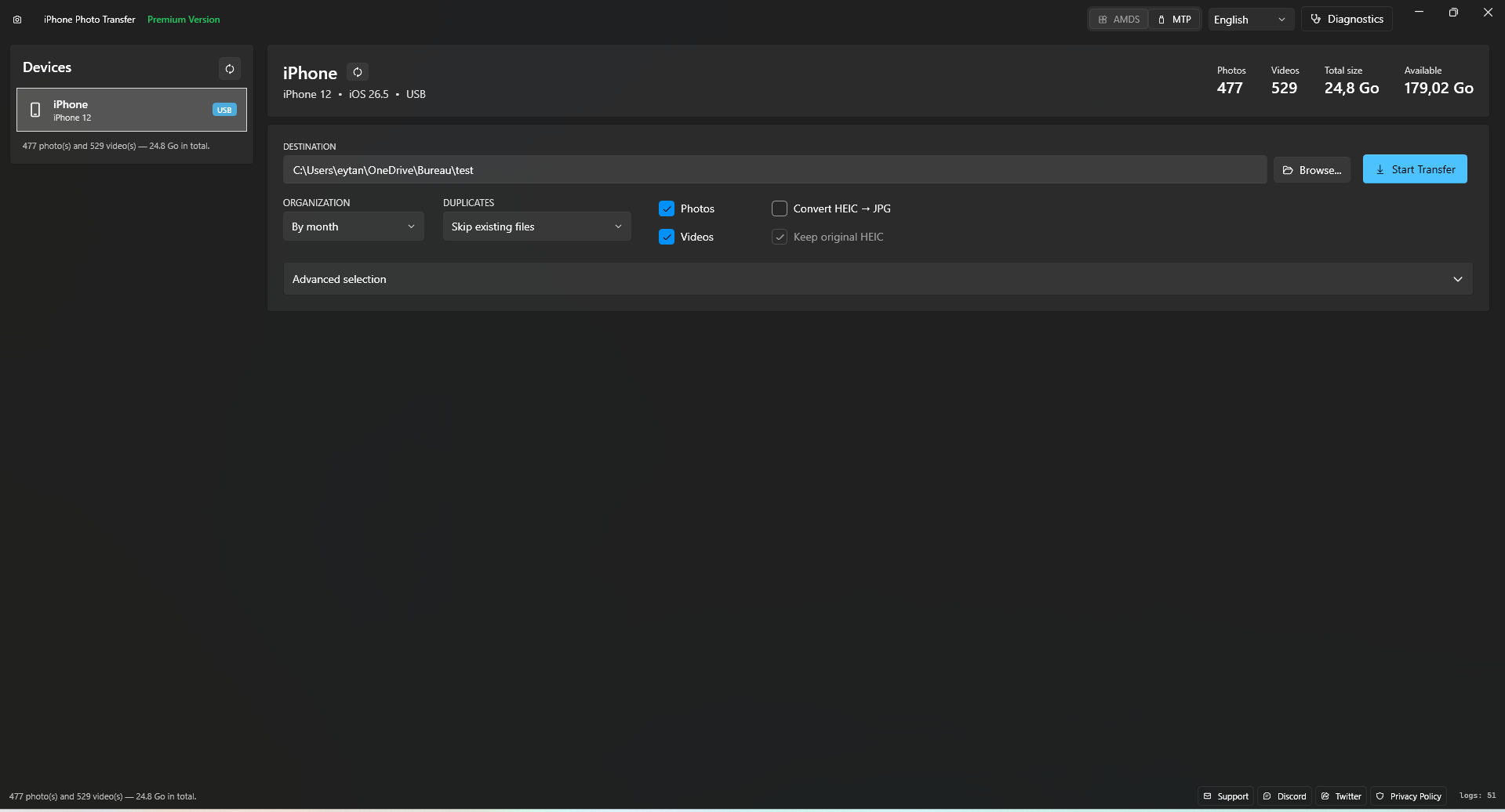
Transfer thousands of photos & videos from your iPhone to your Windows PC in one click, over USB, with zero cloud dependency. Private by design.
Uses Apple's native AMDS protocol for raw speed over USB. Transfers thousands of photos in minutes, not hours, with a much more stable and reliable connection than Windows Explorer.
Automatically converts Apple's HEIC photos to universal JPG format that works everywhere. Keep originals or replace them.
PremiumAutomatically skips files that were already transferred. No more cleaning up thousands of duplicate photos manually.
Photos sorted by month or year automatically into clean folders.
Zero cloud. Zero upload. Everything stays between your iPhone and your PC.
Transfer both photos and videos. Select exactly what you need or grab everything.
No need to install iTunes. The app installs Apple drivers automatically for you.
No configuration, no iTunes, no technical skills required.
Connect via USB cable. The app detects your device instantly and shows photo & video counts.
Pick destination folder, organization style, duplicate policy, and conversion preferences.
Hit the button and watch your photos fly. Sit back and relax.
No credit card required. Try every feature before you buy.
| Feature |
Free Trial
€0
|
Recommended
Premium
€6.99
one-time purchase
|
|---|---|---|
| File transfers | Up to 50 files | Unlimited |
| Transfer speed (AMDS) | ||
| Transfer speed (MTP fallback) | ||
| Smart duplicate detection | ||
| Auto-organize by date | ||
| One-click driver install | ||
| Built-in diagnostics | ||
| HEIC → JPG conversion | ||
| Priority updates | ||
| Download Free | Get Premium · €6.99 |
Secure transaction via the Microsoft Store. Pay once, use forever.
No! The app installs Apple's USB drivers automatically with one click. No need for the full iTunes software. It also works in basic MTP mode without any drivers at all.
Absolutely not. The app works 100% offline. Your photos transfer directly from iPhone to PC via USB. Nothing is uploaded anywhere, ever.
AMDS uses Apple's native protocol for maximum speed and reliability. MTP uses Windows' built-in protocol, which is slower but requires zero setup. The app auto-installs AMDS drivers for you.
The free trial includes all features except HEIC→JPG conversion, with a cap of 50 file transfers per session. This lets you test the app thoroughly before purchasing.
All iPhones running iOS 14+ are supported. Works on Windows 10 (1903+) and Windows 11 (both x64 and ARM64). The app is available in 10 languages (English, French, German, Spanish, Italian, Portuguese, Japanese, Korean, Simplified and Traditional Chinese).
Nope, one-time purchase. Pay €6.99 once, use forever. No recurring fees, no hidden costs. All future updates included.
Stop paying for cloud storage. Stop fighting with Windows Explorer.
Just plug in, click, and transfer.